
E365 Custom Fields
Add your own fields — and even whole new tables — to Business Central, without a developer. Fully native, upgrade-safe, no code.
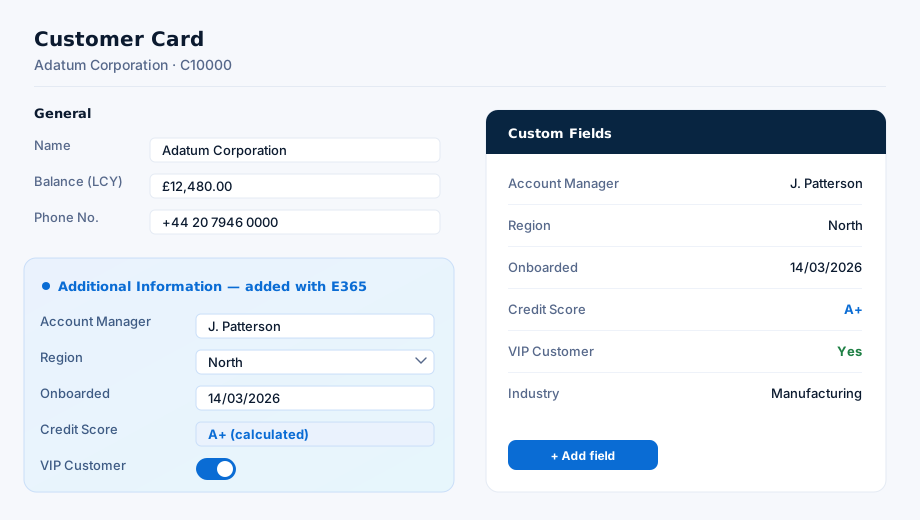
Custom fields on any table · your own field types · a universal FactBox · native Business Central UI
Everything you need, built in
The essentials, done the native Business Central way.
Custom fields on any table
Add your own fields to Customers, Items, Sales documents and more — no development required.
User-defined tables
Create entirely new tables with their own columns, and maintain the data through a ready-made list page.
Rich field types
Text, number, date, boolean, option (your own dropdowns), lookups to related records, and calculated fields.
Calculated & lookup fields
Show a value from a related record, or a FlowField-style total — configured, not coded.
Universal FactBox
Drop an editable Custom Fields FactBox onto any page to see and edit every custom field for the current record.
Fixed field slots
Surface custom fields directly on key list and card pages, with dynamic captions and visibility.
Extend Business Central without touching code
Adding fields to Business Central normally means a development project. Custom Fields lets your team do it themselves — safely — through configuration, with none of the upgrade risk of runtime schema changes.
No development required
Business users add fields and tables themselves through configuration — not AL code.
100% native & SaaS-safe
No JavaScript, no control add-ins, no .NET — fully Universal Code compliant.
No risky schema changes
Values are stored in a safe Entity–Attribute–Value model over fixed tables, so there's no runtime table extension to break upgrades.
Works everywhere
Custom fields appear in the web, tablet and mobile clients and behave like standard fields.
Clean, isolated build
Delivered as a tidy, affix-isolated extension in its own object range.
Grows with you
Start with a couple of fields; scale up to whole user-defined tables when you need them.
Live in four steps
No development project — configure, assign, done.
Install
Add the E365 Custom Fields extension to your Business Central environment.
Define
Create your custom fields — or a whole new table — choosing the type, caption and any lookups or calculations.
Assign
Place fields into slots on the pages that need them, or attach the universal Custom Fields FactBox.
Use
Enter and edit values just like any standard Business Central field.
Native by design
A couple of deliberate design choices keep Custom Fields safe and future-proof — worth understanding up front:
- Values use a safe Entity–Attribute–Value model over fixed tables — that's what keeps it upgrade-safe with no runtime schema changes.
- Field types: Text, Integer, Decimal, Date, Boolean, Option, Lookup and Calculated.
- Surface fields via fixed slots on key pages, or a universal FactBox you can attach anywhere.
Interested in Custom Fields?
Request pricing or ask us anything — tell us your Business Central version and what you'd like to capture, and we'll come straight back to you.